

XrmToolBox: User Settings Utility
In Microsoft Dynamics 365, the default time zone for new user profiles is often set to UTC. To avoid manual adjustments by end users and to ensure consistent time information in the system, system administrators can carry out this configuration centrally and collectively.
The time zone can be adjusted individually in each user’s personal options. However, with a large number of accounts, this manual process is inefficient and error-prone. Standard mass editing of these specific user settings is not provided via the regular Dynamics 365 interface.
Solution via “User Settings Utility”.
It is controlled via the User Settings Utility plugin within the XrmToolBox. This extension enables the simultaneous modification of personal settings for a defined group of users.
Configuration procedure
-
- Start the XrmToolBox and connect it to the corresponding Dynamics 365 instance.
- If required, add the “User Settings Utility” via the integrated Library (Marketplace) tool.

-
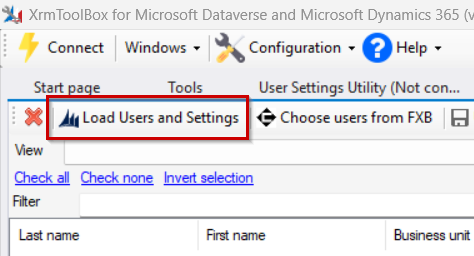
- Use the “Load Users and Settings” function to read all users from the environment.
-
- Select the user accounts in the overview for which the adjustment is to be made.
- Select the desired time zone in the options.
- Start the process via the “Update User(s) Settings” button.

The tool logs the process and lists the updated accounts one after the other. Once the import is complete, the new time zone settings for the selected users are active in the system.